OLED vs QLED: Which TV Technology Should You Buy?
Choose OLED if you watch in a room you can dim and want the deepest black levels and widest viewing angles available. Choose QLED — especially mini-LED QLED — if your room has meaningful ambient light, you want maximum peak brightness, or you'd rather eliminate burn-in risk entirely.
Check price on Amazon →OLED vs QLED: Head-to-Head
| Feature | OLED | QLED (mini-LED) |
|---|---|---|
| Contrast / Black Level | Near-infinite (true blacks) ✅ | Very high, some blooming |
| Peak Brightness | Moderate, OLED-class | Very high ✅ |
| Viewing Angles | Widest available ✅ | Narrower, color shifts off-axis |
| Burn-In Risk | Small long-term risk with static content | None ✅ |
| Typical Price Tier | Flagship / premium | Mid-range to premium |
How Each Technology Actually Works
This is the short version. For the underlying physics — why a colour filter wastes light while a quantum dot converts it, what quantum confinement is, and why OLEDs dim on bright scenes — see how TV display panels actually work.
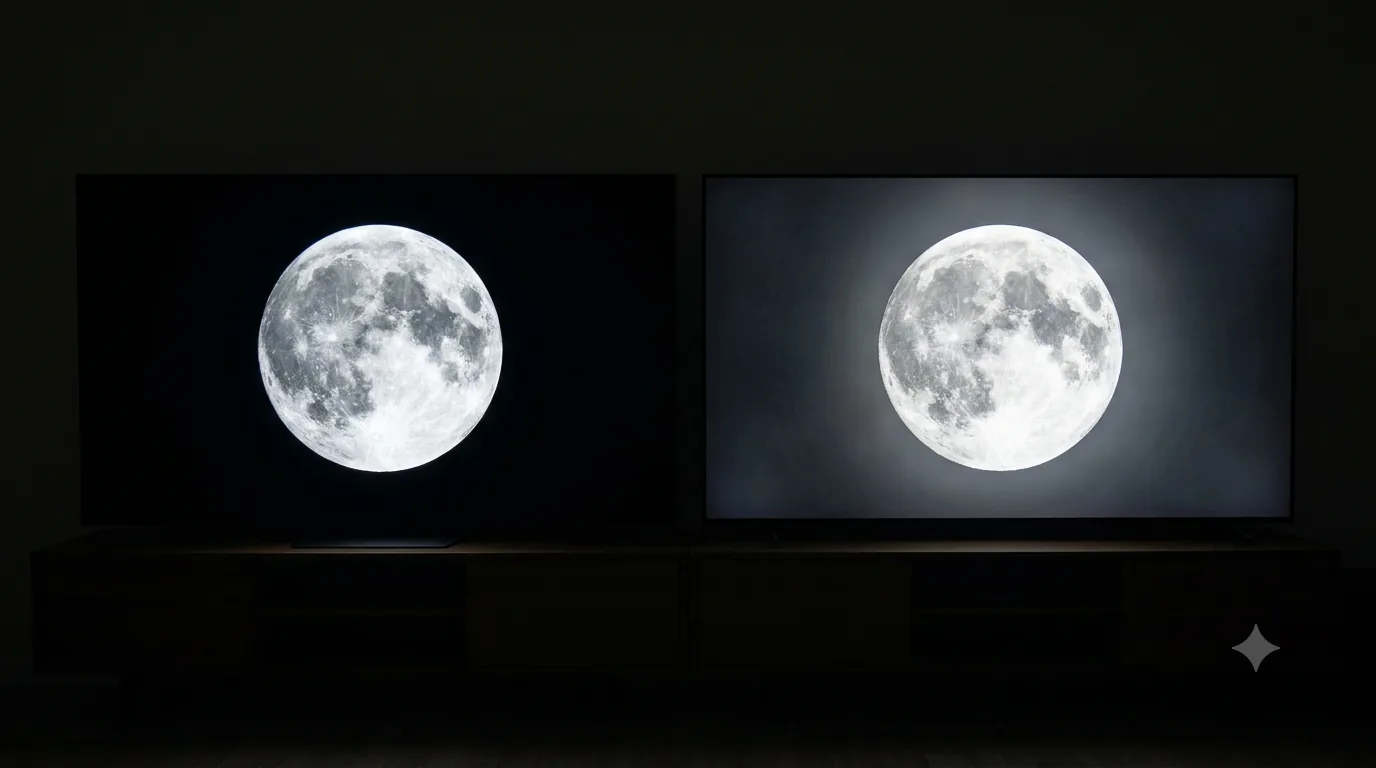
OLED (Organic Light-Emitting Diode) panels are made of millions of individual pixels, each of which generates its own light when an electric current passes through an organic compound. Because every pixel is independently lit, an OLED panel can turn individual pixels completely off — producing genuinely black blacks with no light bleed, which is why OLED contrast is often described as "infinite." There is no separate backlight layer, which also makes OLED panels thinner and lets response times drop to near-instant, a meaningful advantage for fast motion and gaming.
QLED (Quantum-dot LED) is fundamentally still an LED-backlit LCD TV. A layer of quantum dots sits in front of the LED backlight and converts that light into more precise, saturated colors than a standard LED TV can produce. The best modern QLEDs use mini-LED backlighting — thousands of tiny LEDs organized into hundreds or thousands of independently dimmable zones — which dramatically improves local contrast versus older edge-lit LED TVs, though it still can't match OLED's per-pixel control. The backlight is also what gives QLED its brightness advantage: you can simply run more, brighter LEDs behind the panel in a way OLED's self-emissive pixels can't match without risking panel wear.
Burn-In: How Worried Should You Be?
Burn-in — a faint, permanent ghost image from content left static too long — was a real concern on early OLED TVs. Modern OLEDs include several mitigations: pixel-shifting that nudges the image by a few pixels periodically, automatic dimming of static elements, screen savers that kick in after idle time, and panel-refresh routines that even out uneven pixel wear. For typical mixed viewing — streaming shows, movies, sports, varied gaming — the real-world risk in 2026 is low. The scenarios that still carry meaningful risk are things like a 24/7 cable news channel with a permanent ticker/logo, or leaving a paused video game screen up for many hours at a time, day after day. If that's your exact use case, a bright-room QLED sidesteps the question entirely — QLED has no organic pixels to degrade.
Brightness and Room Lighting
This is the single biggest factor in choosing between the two. High-end mini-LED QLEDs can produce dramatically higher peak brightness than any current OLED, which matters directly for how well a picture holds up against window glare, bright overhead lighting, or daytime viewing. If your TV lives in a bright, sun-lit living room, even a flagship OLED can look comparatively dim and washed out next to a well-configured mini-LED QLED. Conversely, in a dim or fully dark room, OLED's lower peak brightness is a non-issue — and its superior black levels and contrast become the dominant, more noticeable advantage.
Viewing Angles
If your seating is spread across a wide sectional, a kitchen island, or multiple angles around the room, OLED's viewing-angle advantage is significant. QLED (and LED TVs generally) route backlight through several layers of liquid crystal and color filters, and that light scatters unevenly at steep angles — color saturation and contrast both degrade noticeably off-axis. OLED's self-emissive pixels don't have this problem; picture quality stays far more consistent from a 45- or 60-degree seat. Manufacturers have narrowed this gap somewhat with wide-viewing-angle QLED coatings on some premium models, but OLED still leads clearly.
Who Should Buy Which
Buy OLED if you:
- Watch primarily in a dim or fully dark, dedicated room
- Want the deepest black levels and best overall contrast
- Have wide or angled seating and want consistent picture quality off-axis
- Are a fast-motion gamer who values near-instant pixel response
Check OLED TV prices on Amazon →
Buy QLED (mini-LED) if you:
- Have a bright room with windows or strong overhead lighting
- Want maximum peak brightness for daytime sports or HDR highlights
- Want zero burn-in risk, e.g., for 24/7 news or static gaming HUDs
- Want strong picture quality at a lower price tier, especially at large screen sizes
Check QLED TV prices on Amazon →
Complete Your TV Setup
Full-Motion TV Wall Mount
A tilt-and-swivel mount fixes glare and off-angle viewing in ways no TV setting can — especially in bright or awkward-shaped rooms.
Shop on Amazon →Soundbar
Built-in TV speakers are thin and fire backward or downward. Even an entry-level soundbar is a bigger upgrade than most people expect.
Shop on Amazon →HDMI 2.1 48Gbps Cable
4K/120Hz, VRR, and eARC all depend on genuine HDMI 2.1 bandwidth. Older HDMI 2.0 cables silently cap you at 60Hz or drop features.
Shop on Amazon →Surge Protector
A power surge can kill a TV's main board instantly. A dedicated surge protector is cheap insurance for an expensive panel.
Shop on Amazon →Streaming Stick
Even smart TVs slow down after a couple of years. A current-generation streaming stick keeps the app experience fast and current.
Shop on Amazon →Microfiber Screen Cleaning Kit
Paper towels and glass cleaner can scratch or streak modern anti-glare coatings. A microfiber-and-solution kit is made for screens.
Shop on Amazon →Cable Management Kit
Wall-mounted TVs look unfinished with cables hanging loose — raceways and clips keep the whole setup tidy in an afternoon.
Shop on Amazon →Frequently Asked Questions
Neither is universally 'better' — they trade off differently. OLED wins on contrast, black levels, and viewing angles because each pixel is its own light source and can switch fully off. QLED wins on peak brightness, is generally more affordable at large screen sizes, and carries zero burn-in risk. The right choice depends on your room's lighting and what you watch most.
The risk is much lower than early OLED generations thanks to pixel-shifting, screen-saver logic, and panel-wear compensation, but it is not zero. Static content left on screen for extended periods — a 24/7 news channel logo, a stuck video game HUD — carries a small long-term risk. Normal mixed viewing (streaming, movies, varied content) is very low risk.
QLED, especially mini-LED QLED, wins on peak brightness by a wide margin — mini-LED backlighting can push far more nits than an OLED panel can sustain, particularly in full-screen bright scenes. This is why QLED is generally the better choice for rooms with significant ambient light.
OLED, decisively. Because each OLED pixel emits its own light in all directions, color and contrast hold up well even from a sharp side angle. QLED's LED backlight has to pass through more layers, so color and contrast noticeably shift and wash out off-axis — a real consideration for wide couches or open floor plans.
QLED is a type of LED-backlit TV that adds a quantum-dot filter layer in front of the LED backlight to widen the color gamut and improve brightness efficiency. It is not the same technology as OLED, despite the similar-sounding name — QLED still relies on a backlight; OLED does not.
Last reviewed: July 19, 2026. Panel technology descriptions reflect general industry engineering consensus; specific nit ratings and dimming-zone counts vary by exact model and model year — check the current listing on Amazon for specs.